
DevLog: Now I Get It!
An app to help everyone understand scientific papers


Understanding scientific articles can be tough, even in your own field. Trying to comprehend articles from others? Good luck.
Here’s an app for curious people.
Agentic engineering with AI makes building software faster than ever before. This app started as an idea while waiting to board a plane for a ski vacation. Anytime I had a moment, I would plan features with Claude. Then I’d set it loose to build while I was taking off, landing, in the powder, at apres ski, or at dinner. Claude was nearly always working.
Unlike canonical vibe coding, which is great for building simple things, this application has a fairly sophisticated cloud architecture. Opus 4.6 was a great partner.
The rest of this article was written by Claude using my DevLog Skill.
Development Log - Now I Get It!
About This Project
Now I Get It! transforms scientific papers into interactive web pages that explain the paper to a layperson. The goal is to make academic research accessible to anyone.
Status: Live at https://nowigetit.us Started: 2026-02-21 Last Updated: 2026-02-27
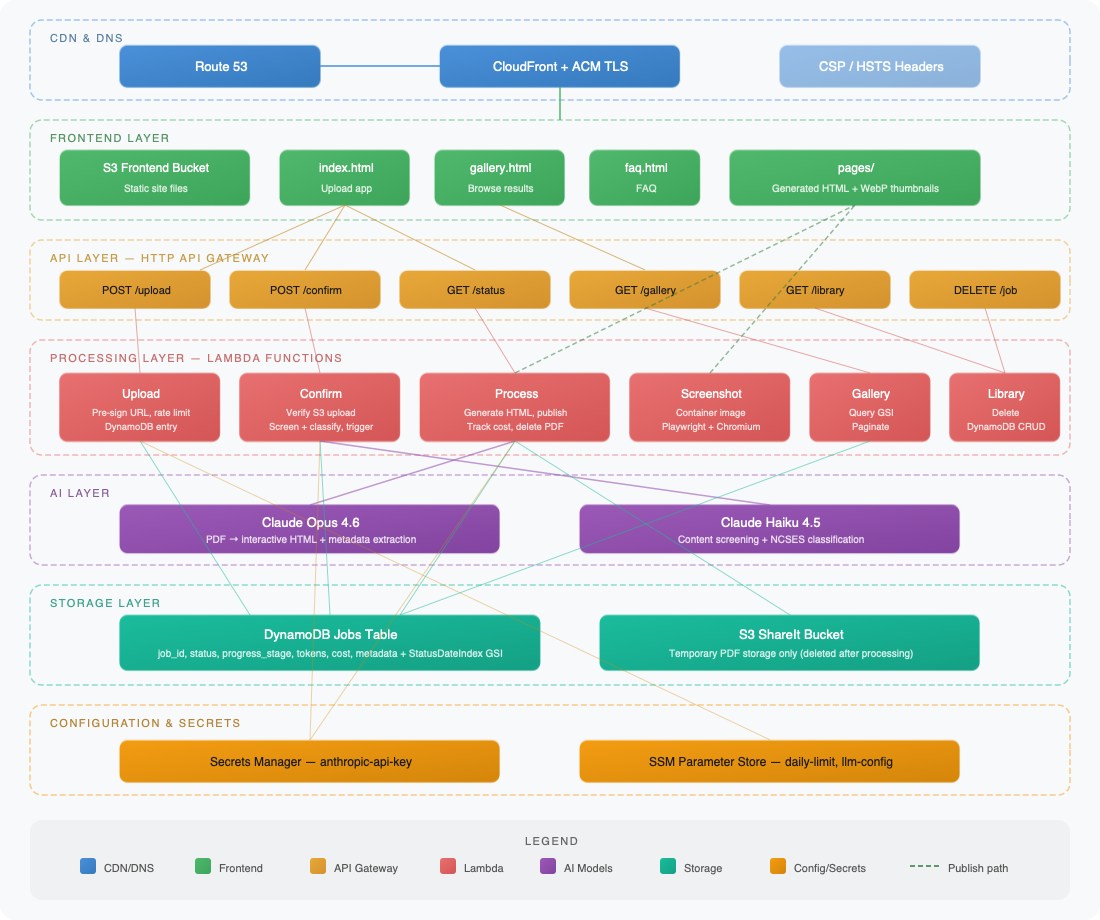
System Architecture
Upload & Generation Sequence
2026-02-21 - Project Inception
The idea was simple: take a scientific paper (PDF), send it to Claude, and get back an interactive web page that explains the paper to a non-expert. The initial implementation was built as a FastAPI backend with a vanilla HTML frontend – no React, no build tools, just the simplest thing that works.
The core pipeline: upload PDF -> extract text -> send to Claude Opus 4.6 -> parse the HTML response -> publish as a public GitHub Gist on the jbdamask account. The frontend polls for status while processing happens asynchronously.
The initial scaffolding came together quickly as a local dev setup with FastAPI serving both the API and the static frontend.
2026-02-21 - AWS Deployment and First Bugs
Moved from local dev to AWS: CloudFormation template with API Gateway (HTTP API), three Lambda functions (upload, process, status), DynamoDB for job tracking, and S3 for both the frontend and temporary PDF hosting.
The first deployment surfaced a classic Lambda gotcha – pip installs macOS binaries by default, but Lambda runs on Linux. Fixed by adding --platform manylinux2014_x86_64 --only-binary=:all: to the pip install in the deploy script. Also discovered Claude’s API requires HTTPS URLs for documents, so switched the PDF hosting to use HTTPS S3 URLs instead of HTTP.
The GitHub token needed for Gist publishing required a fine-grained PAT. The only way to grant Gists permission is to also select read-only access to all public repos – a GitHub limitation, not a design choice.
2026-02-21 - Streaming and Truncation Fixes
Hit the first real production bug: Claude’s responses for complex papers were getting truncated. The HTML output was being cut off mid-tag. The root cause was that large responses weren’t being streamed – the SDK was buffering the entire response before returning it.
Switched to client.messages.stream() with text_stream iteration, which solved the truncation issue and dramatically reduced memory pressure on the Lambda. Also bumped max_tokens to 64000 to give Claude enough room for complex papers.
2026-02-21 - Progress Stages and UI Redesign
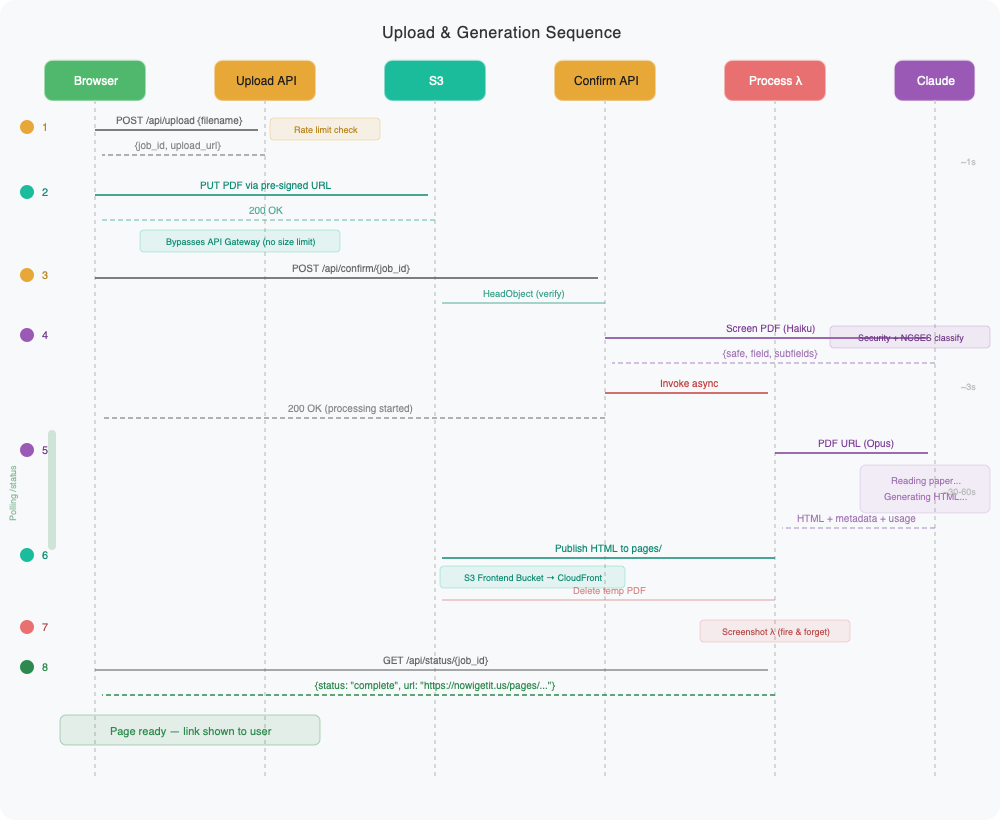
Processing takes 30-60 seconds, which felt like an eternity with no feedback. Added a progress stepper to the frontend showing four stages: Uploading PDF, Reading paper, Generating interactive page, and Publishing to web. The backend writes progress_stage to DynamoDB, and the frontend polls it to update the stepper.
Also redesigned the entire frontend. Went from a basic unstyled form to a dark-themed UI with DM Serif Display headings, ambient glow effects, grain overlay, and smooth animations. The drop zone supports drag-and-drop with visual feedback. It’s intentionally moody – makes the “aha moment” when you get the result link feel more satisfying.
2026-02-22 - Daily Rate Limit
Each PDF processing job costs real money (Claude API + GitHub API), so the app needed a daily cap to prevent runaway costs or abuse. The initial implementation used an atomic DynamoDB counter with a date-keyed item (RATE_LIMIT#2026-02-22) in the jobs table, but after deploying and testing, this approach felt wrong – mixing rate limit bookkeeping with actual job records in the same table was messy.
Reworked the approach: the daily limit now lives in SSM Parameter Store (/nowigetit/daily-processing-limit, default 20), and the upload Lambda counts today’s jobs by scanning DynamoDB records with a created_date field. This is cleaner because the limit is adjustable in Parameter Store without redeploying, and job records are the source of truth for the count. The created_date field was added to every job record – something that should have been there from the start.
Hit a DynamoDB API gotcha along the way: if_not_exists() is only valid in UpdateExpression, not in ConditionExpression. The fix was attribute_not_exists(request_count) OR request_count < :limit, though this became moot when the atomic counter was replaced entirely.
The frontend handles 429 responses with a specific message (“Daily limit reached – please try again tomorrow”) and re-enables the upload button.
2026-02-22 - API Cost Tracking
Added per-job cost tracking. The Claude API response already includes input_tokens and output_tokens in the usage object – stream.get_final_message().usage was already being called but the data was being thrown away. Now generate_html() returns a (html, usage) tuple, and the process Lambda calculates costs using Opus 4.6 pricing ($5/MTok input, $25/MTok output) and writes five fields to each job’s DynamoDB record: input_tokens, input_tokens_cost, output_tokens, output_tokens_cost, and total_cost.
The frontend displays a cost breakdown below the gist link after processing completes, showing input tokens, output tokens, and total cost. Keeps the operator aware of what each paper costs to process.
2026-02-22 - Final Polish: Footer and Secrets Descriptions
Two small cleanup tasks to close out the initial build.
Replaced the “Powered by Claude” footer with a proper copyright line (“© 2026 Amroja, LLC”) on the left and a link to johndamask.com on the right, using flexbox to keep them apart. Changed the footer from a <p> to a <div> to hold the two elements.
Also added human-readable descriptions to the two Secrets Manager secrets (nowigetit/anthropic-api-key and nowigetit/github-token) in the deploy script. Both the create and update paths now set descriptions, so anyone browsing the AWS console can immediately see what each secret is for without having to trace through code.
With these two changes deployed, all 8 beads issues are closed. The project is feature-complete for its initial release.
2026-02-22 - S3 Publishing and Custom Domain
Two infrastructure changes in one session.
First, replaced GitHub Gist publishing with direct S3 uploads. Generated HTML pages now go to share-it-amroja/NOWIGETIT/{job_id}.html instead of creating a Gist via the GitHub API. This eliminated the GITHUB_TOKEN requirement, the requests library dependency, and the gistpreview.github.io external dependency. The new s3_publisher.py is 25 lines versus the old gist_publisher.py‘s 37. Also fixed a tuple unpacking bug in main.py where generate_html() returns (html, usage) but local dev was only capturing html.
Second, added the custom domain nowigetit.us. The deploy script now provisions an ACM certificate with DNS validation (idempotent – reuses existing cert on re-deploy), and CloudFormation creates a CloudFront distribution fronting the S3 frontend bucket. A CloudFront Function handles www.nowigetit.us → nowigetit.us 301 redirects. The ACM cert is created in deploy.sh rather than CloudFormation to avoid the stack blocking while waiting for DNS validation. CORS and Lambda ALLOWED_ORIGIN env vars updated to allow
https://nowigetit.us
.
Key architectural decision: CloudFront uses the S3 website endpoint as a custom HTTP origin (no OAC) to avoid changing the S3 bucket configuration. The API stays on the raw API Gateway URL since it’s only referenced in config.js.
2026-02-23 - PDF Metadata and the Library Carousel
Two features landed in quick succession, and the second immediately exposed bugs in the first.
Started with PDF metadata extraction (Issue #1). The system prompt already tells Claude to generate the HTML page, so it was straightforward to also ask it to emit a <metadata> XML block with the paper’s title, authors, and publication date. The _parse_metadata() function in generator.py strips it from the HTML before publishing. The process Lambda stores paper_title, paper_authors, and paper_date in DynamoDB alongside the existing job fields.
Then came the carousel (Issue #2) – a horizontally-scrolling row of cards on the home page showing previously generated explanations. This required a new GET /api/library endpoint backed by lambda_library.py, which scans DynamoDB for completed jobs and returns them sorted by date. The frontend renders cards with paper titles, authors, and dates, and auto-refreshes the carousel after each new upload completes. The carousel is hidden entirely when the library is empty.
Building the carousel uncovered a TTL problem: completed DynamoDB items had a 24-hour TTL, which meant successfully processed papers disappeared from the library the next day. Fixed by stripping the TTL attribute (REMOVE #ttl) from the process Lambda’s success-path update expression. Errored and in-progress items still clean themselves up.
Once both features were deployed and the carousel appeared on the live site, three bugs became immediately obvious: cards showed filenames instead of paper titles, authors weren’t rendered at all, and the processing date was displayed instead of the paper’s publication date. Investigation revealed the metadata extraction pipeline was actually working correctly – the bugs were all in the frontend rendering code. The trickier issue was that the four papers already in DynamoDB had been processed before the metadata PR landed, so they had no paper_title/paper_authors/paper_date fields at all. Backfilled them by scraping titles, authors, and dates from the generated HTML pages already sitting in S3 (since the source PDFs are deleted after processing).
2026-02-23 - Branding and UI Polish
A batch of small visual improvements. Added the NowIGetIt logo to the title row and as a favicon. Replaced the old tagline with a single description line (“Scientific articles, explained.”) between the carousel and the upload zone. Updated footer branding. All purely cosmetic, no backend changes.
2026-02-24 - Externalize LLM Configuration
The model name and per-token pricing were hardcoded across multiple files – generator.py, lambda_process.py, main.py. This meant changing the model or updating pricing after an Anthropic price change required a code deploy. Moved both into a single SSM Parameter Store value (/nowigetit/llm-config) as a JSON blob: {"model": "claude-opus-4-6", "input_price_per_mtok": 5.00, "output_price_per_mtok": 25.00}. The process Lambda reads it on each invocation, with a hardcoded fallback if SSM is unreachable. Now switching to a different Claude model or updating pricing is a single Parameter Store edit – no deploy needed.
Also threaded the model parameter through generate_html() so it’s no longer hardcoded at the SDK call site. The local dev server reads model config the same way for parity.
2026-02-24 - Pre-signed S3 URL Uploads
The biggest architectural change since launch. API Gateway has a ~10MB payload limit (6MB for Lambda proxy integrations with base64 encoding overhead), which meant users couldn’t upload larger scientific papers. A 19MB PDF would simply fail.
Replaced the direct multipart upload with a three-step flow: 1. Initiate: Frontend sends POST /api/upload with {"filename": "paper.pdf"}. The upload Lambda validates the filename, checks the daily rate limit, generates a job ID, creates a pre-signed S3 PUT URL (5-minute expiry, content-type locked to application/pdf), writes an awaiting_upload record to DynamoDB, and returns {job_id, upload_url}. 2. Upload: The browser PUTs the PDF directly to S3 using the pre-signed URL. The file never touches API Gateway or Lambda. 3. Confirm: Frontend sends POST /api/confirm/{job_id}. A new confirm Lambda verifies the S3 object exists via HeadObject, flips the DynamoDB status to processing, and invokes the process Lambda asynchronously.
This required a new Lambda function (lambda_confirm.py), CloudFormation additions (ConfirmFunction, API Gateway route and integration, Lambda permission), an IAM policy update (s3:HeadObject), and S3 CORS configuration on the ShareIt bucket to allow cross-origin PUT from nowigetit.us. The deploy script now packages lambda_confirm.py and applies the CORS config as an idempotent step.
The upload Lambda shrank dramatically – no more multipart parsing, no more s3.put_object, no more lambda_client.invoke. Timeout dropped from 30s to 10s, memory from 256MB to 128MB.
The frontend change is transparent to the user. All three steps happen during the same “Uploading PDF” stepper phase. Same drag-and-drop, same progress stepper, same error messages. The only visible difference: files up to 50MB now work where they previously failed. Verified end-to-end with a 19MB PDF – uploaded via pre-signed URL, confirmed, processed by Claude in ~3.7 minutes, and the generated page appeared on the live site.
2026-02-25 - Landing Page Overhaul (Issue #8)
The landing page needed to do a better job of explaining what the app actually does. Tackled this as a five-part epic (GitHub Issue #8), working in a git worktree on a 8-improve-landing-page branch to keep main stable.
The layout was tightened up – top-anchored instead of vertically centered, compact horizontal drop zone (icon left, text right), tighter margins throughout so everything from title to upload button fits on a 1080p screen without scrolling. The old single “description” line was split into a proper tagline (“Scientific articles, explained.” at 1.3rem) and a description sentence below it (at 1rem) explaining the upload-to-interactive-page workflow. A subtle “Works best with files under 10 MB” hint was added inside the drop zone in muted text – soft guidance, not a hard limit.
The upload zone now grays out with pointer-events: none during processing so users can’t accidentally trigger a second upload. A “Recreate” button appears next to the Copy button when processing completes, letting users re-run the same PDF through Claude to get a different explanation. This required a new backend endpoint (DELETE /api/job/{job_id}) to clean up the old DynamoDB record before re-uploading, preventing duplicate entries in the library carousel. The delete endpoint shipped as a new Lambda (lambda_delete.py) with its own API Gateway route, and the IAM policy got dynamodb:DeleteItem added.
Used an index2.html staging approach for testing – uploaded the work-in-progress to S3 as index2.html alongside the production index.html, so changes could be previewed at nowigetit.us/index2.html without affecting live users. Once approved, deployed normally and cleaned up the test file.
After merging PR #9, a few more polish passes landed directly on main: the title row was visually centered by adding right padding equal to the logo width (the logo was making the row appear shifted left relative to the centered subtitle), the footer got copyright and author link, and the carousel gained continuous auto-scrolling.
2026-02-25 - Auto-scrolling Carousel
The library carousel was static – users had to click arrows to browse. Converted it to a continuously auto-scrolling marquee using requestAnimationFrame at 0.25px/frame for a smooth, slow drift. The trick to seamless looping: clone all carousel cards and append them, then when scrollLeft passes the original set’s width, jump it back by that amount. The clones ensure the visible cards are identical at the jump point, making the reset invisible.
The scroll-snap CSS had to be disabled since it conflicts with sub-pixel continuous scrolling. Both arrow buttons now always show (no hiding at “ends” since there are no ends). User interactions pause the auto-scroll: arrow clicks pause for 5 seconds, hovering over the carousel pauses immediately, and mouse-leave resumes after 1 second. All pause/resume logic shares a single timer to avoid race conditions.
2026-02-25 - Article Field Metadata (Issue #10, PR #11)
The library carousel cards showed paper titles and authors, but nothing about what kind of paper it was. Extended the metadata extraction to include the paper’s academic field and subfields. The Claude system prompt now requests <field> and <subfields> elements inside the <metadata> XML block. The _parse_metadata() function in generator.py extracts both, and they flow through DynamoDB, the status API, the library API, and local dev – same pipeline as title/authors/date.
This was a clean vertical slice: prompt change, parser update, storage, and all API surfaces in one commit. Merged as PR #11.
2026-02-25 - User-Friendly Error Messages
Discovered while testing with a large PDF (agents-of-chaos.pdf) that exceeds Claude’s 185K input token limit. The user saw “Processing failed.” with no explanation – the actual error was buried in CloudWatch logs. Not a great experience when the fix is simply “try a shorter document.”
Wrapped the client.messages.stream() call in generator.py with a try/except for anthropic.APIStatusError. The handler inspects the error body and maps known failures to plain-English ValueError messages: “prompt is too long” becomes “This PDF is too large for our AI to process. Try a shorter document.” Rate limits, auth errors, and server errors each get their own message. An unknown API error includes the original message as a fallback.
The key design decision was using ValueError as the boundary between “user-facing” and “unexpected” errors. Both lambda_process.py and main.py now catch ValueError separately from Exception – the former stores str(e) (the friendly message), the latter keeps the generic “Processing failed.” No frontend changes needed since it already displays whatever error string the status API returns.
2026-02-25 - Prompt Injection Defense (Issue #6)
NowIGetIt sends user-uploaded PDFs to Claude and publishes the resulting HTML to the web. That’s a prompt injection vector – a malicious PDF could contain instructions that Claude follows, injecting scripts or harmful content into the published page. This needed defense-in-depth rather than a single guardrail.
Four layers went in. First, the system prompt was hardened to explicitly tell Claude that PDF content is untrusted data and to restrict the output to educational HTML – no external links, no scripts, no iframes. Second, generator.py gained suspicious pattern detection that logs warnings when the generated HTML contains <script>, <iframe>, event handlers, or data URIs. Third, a Haiku-based pre-screening module (content_screen.py) classifies uploaded PDFs before they reach the expensive Opus processing – if the PDF looks like it’s trying to manipulate the AI, it’s rejected with an explanation before spending any Opus tokens. Fourth, CloudFront security headers (CSP, HSTS, X-Frame-Options, X-Content-Type-Options) provide browser-level backstops.
The CSP header caused an immediate production bug: connect-src 'none' blocked all fetch() calls from the frontend, including the carousel’s library endpoint. Fixed it the same evening by changing connect-src to allow the API Gateway origin while still blocking arbitrary external connections that injected scripts might attempt.
Also created a test harness (tests/make_injection_pdf.py) that generates PDFs with embedded prompt injection attempts – useful for verifying all four defense layers work together.
2026-02-25 - Gallery Page (Issue #13)
The biggest feature since launch. The carousel on the home page shows the most recent papers, but with 17+ generated explanations there was no way to browse them all. The gallery page at /gallery.html is a full-page grid view with thumbnails, field-based filtering, and infinite scroll.
The Architecture
The gallery required three new Lambda functions working together:
Screenshot Lambda (container image): A Playwright/Chromium headless browser running in Lambda that navigates to each published explanation page, takes a screenshot, converts it to WebP (via Pillow), and uploads the thumbnail to S3. This is the first container-based Lambda in the project – zip-packaged Lambdas can’t include a browser binary. The process Lambda now fires off an async screenshot invocation after successfully publishing each new page.
Gallery Lambda (zip): Queries a new DynamoDB Global Secondary Index (StatusDateIndex, partition key status, sort key created_date) to efficiently fetch completed items in reverse chronological order. Supports cursor-based pagination (base64url-encoded ExclusiveStartKey) and an optional field query parameter for filtering by scientific discipline. Returns items with pre-computed thumbnail URLs.
Backfill script (scripts/backfill_thumbnails.py): A one-off script that scans DynamoDB for all completed items, checks S3 for existing thumbnails, and invokes the Screenshot Lambda for any that are missing. Rate-limited to 5 concurrent invocations.
The Frontend
The gallery page (gallery.html) is a standalone HTML file matching the index page’s dark theme – DM Serif Display headings, amber accents, glass-card effects, grain overlay. It renders a responsive grid (3 columns on desktop, 2 tablet, 1 mobile) with infinite scroll powered by IntersectionObserver. A field filter dropdown lets users browse by scientific discipline. Thumbnails have a graceful fallback: if the WebP fails to load, an onerror handler replaces it with a gradient colored by the paper’s field.
Deployment Gauntlet
Getting the Screenshot Lambda to actually work in production required solving five separate problems, each discovered only after deploying:
ECR chicken-and-egg: CloudFormation’s Screenshot Lambda resource references an ECR image URI, but the ECR repository and image don’t exist until the stack creates them. The main stack failed on first deploy. Solution: split the ECR repository into a separate CloudFormation template (
aws/ecr.yaml) that deploys first, then the deploy script builds and pushes the Docker image, then the main stack deploys referencing the existing image.ARM Mac building for x86_64 Lambda: Docker on Apple Silicon builds ARM images by default. Lambda runs x86_64. Added
--platform linux/amd64to the Docker build command.Multi-arch manifest rejection: Docker buildx on ARM Macs creates a multi-architecture manifest list even when building for a single platform. Lambda’s container runtime rejected it with “image manifest, config or layer media type not supported.” The fix:
--provenance=falseforces a single-platform image manifest.Playwright browser path: The Dockerfile’s
playwright install chromiumruns as root during build, installing to root’s home directory. Lambda runs assbx_user1051, which can’t access root’s home. SetPLAYWRIGHT_BROWSERS_PATH=/opt/browsersin the Dockerfile so the browser installs to a globally-readable path.Chromium sandbox crash: Even with the browser found, Chromium crashed immediately with “Target page, context or browser has been closed.” Lambda’s sandboxed execution environment doesn’t support the Linux user namespace sandbox that Chromium enables by default. Fixed with five launch flags (
--no-sandbox,--disable-setuid-sandbox,--disable-dev-shm-usage,--disable-gpu,--single-process) and bumped Lambda memory from 1024MB to 2048MB since headless Chromium needs the headroom.
Also hit an S3 static hosting gotcha: the gallery link was /gallery but S3 serves files by key name – there’s no URL rewriting. Changed to /gallery.html.
After all five fixes, the backfill ran clean: 17 thumbnails generated, zero failures, all WebP files sitting in S3 at 20-46KB each. The gallery page is live at https://nowigetit.us/gallery.html.
2026-02-25 - Two Regressions from the Security Hardening
The prompt injection defense commit (01a4981) broke two things that weren’t caught until after the gallery page work was deployed.
Upload flow broken by CSP. The CloudFront Content-Security-Policy header included connect-src https://*.execute-api.us-east-1.amazonaws.com to allow frontend API calls, but the pre-signed upload flow PUTs files directly to share-it-amroja.s3.amazonaws.com – a different domain entirely. The browser blocked the S3 PUT with a CSP violation, surfacing as a cryptic “Failed to fetch” error. Added
https://*.s3.amazonaws.com
and
https://*.s3.us-east-1.amazonaws.com
to connect-src. This was the second CSP-related bug from the same commit – the first (connect-src 'none' blocking all API calls) was caught earlier, but this one slipped through because the upload flow involves a cross-origin request to S3 that wasn’t covered by testing the carousel endpoint alone.
HTML extraction broken by overzealous input validation. The same security commit tightened the raw HTML detection in generator.py from "<html" in response_text (substring search) to response_text.startswith("<html") (must be at position 0). The intent was to prevent Claude from sneaking content before the HTML. The problem: Claude’s response always starts with a <metadata> XML block (title, authors, field) before the HTML, by design of the system prompt. With startswith, the metadata block meant the HTML detection never matched, causing every upload to fail with “Claude did not return valid HTML.” The fix was to strip the <metadata> block before running all HTML extraction checks – code fences, truncated fences, and raw HTML detection all now operate on the cleaned response.
Both bugs shared a common cause: the security hardening was tested against injection scenarios but not against the normal happy path. A lesson in regression testing – security changes need to be validated against the primary user flow, not just the threat model.
2026-02-26 - Standardized NCSES Taxonomy (Issue #17)
The field classification system had a design flaw from the start. When metadata extraction was added (Feb 23), Claude Opus was asked to pick a “primary field” and “subfields” with only loose examples (“e.g. Biology, Physics, Computer Science”). This produced inconsistent categories – one paper might get “Biology” while a similar one got “Biological Sciences” or “Life Sciences.” The gallery’s field filter and grouping were only as good as Claude’s ad-hoc choices, which meant browsing by field was unreliable.
The fix was to replace the open-ended classification with the NSF’s NCSES Taxonomy of Disciplines – 15 broad fields and ~55 subfields used by the National Center for Science and Engineering Statistics for their Survey of Earned Doctorates. This gives the system a constrained vocabulary that’s both well-known in academia and granular enough to be useful.
Moving Classification from Opus to Haiku
The more interesting architectural change was where classification happens. Previously, Opus did everything: read the PDF, classify the field, and generate the interactive HTML page – all in one expensive call. But the Haiku content screening call (added for prompt injection defense) already reads the full PDF to check for adversarial content. That’s wasted context if Haiku isn’t also classifying.
The new flow combines screening and classification into a single Haiku call. The SCREENING_PROMPT now has two jobs: security screening (same as before) and NCSES field classification. The CLASSIFY_TOOL schema expanded from {safe, reason} to {safe, reason, field, subfields}. One PDF read, two results. Haiku costs roughly 1/60th of Opus per token, so classification is essentially free now.
This also freed Opus from the classification burden. The <field> and <subfields> XML instructions and parsing were removed entirely from generator.py, giving Opus more context window for what it’s actually good at – generating the interactive HTML explanation.
Wiring the Pipeline
The classification result needed to flow through the entire pipeline. In local dev (main.py), the screening result’s field and subfields are stored in the in-memory job dict immediately after screening, then preserved through to the completion state. In AWS, lambda_confirm.py passes paper_field and paper_subfields from the screening result into the process Lambda’s event payload, and lambda_process.py reads them from the event instead of from generate_html() metadata (which no longer provides them). Six files changed across the pipeline.
Backfill and Gallery
The backfill script (scripts/backfill_fields.py) was updated with the same NCSES taxonomy in its Haiku prompt, plus a --reclassify-all flag that scans every completed record rather than just uncategorized ones. Since the backfill can’t send PDFs (they’re deleted after processing), it continues to classify from the published HTML page, but with the NCSES taxonomy constraining the output.
A --dry-run --reclassify-all pass showed clean results across all 21 records – consistent field names, sensible subfield assignments. The live run migrated all 21 records to NCSES-compliant classifications.
The gallery page gained sub-field grouping within each field section. Cards are now organized in a two-level hierarchy: field heading (uppercase, muted), then subfield heading (smaller, left-bordered) with a grid of cards underneath. Cards without subfield data still render under their field heading without a subfield divider. The existing text search and field filter dropdown continue to work unchanged.
2026-02-26 - FAQ Page
Added /faq.html with 12 Q&As covering what the site does, cost, security, file size limits, and daily upload caps. Same glass-card design as the other pages. Footer across all three pages now shows a centered FAQ link between the copyright and johndamask.com.